
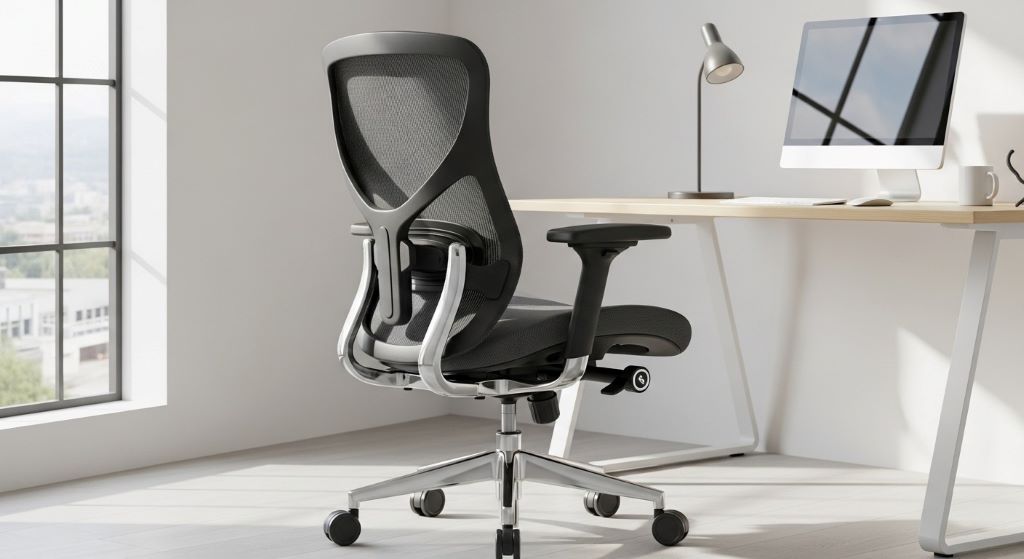
Chronic back pain affects millions of workers worldwide, especially those who spend long hours sitting at desks. Many people don’t realize that their office chair might be the culprit behind their discomfort. Finding the right seating solution can make a tremendous difference in daily comfort and long-term spinal health.
The modern workplace has evolved significantly over the past few decades. However, one aspect remains constant: people sit for extended periods. This sedentary lifestyle puts enormous strain on the spine, muscles, and joints. Understanding how proper seating supports the body can help you make informed decisions about your workspace setup.
Understanding Chronic Back Pain in Office Workers
Back pain ranks among the most common complaints in professional environments. The lower back typically bears the brunt of poor sitting habits. When you sit incorrectly for hours, the natural curve of your spine becomes compromised. This leads to muscle fatigue, nerve compression, and eventual pain.
Several factors contribute to workplace-related back problems. Poor sitting posture tops the list. Additionally, inadequate lumbar support, improper desk height, and prolonged static positions all play significant roles. Many workers also fail to take regular breaks, which compounds these issues.
The cost of back pain extends beyond physical discomfort. It affects productivity, mental health, and overall quality of life. Workers experiencing chronic pain often struggle to concentrate and may need to take sick days. Therefore, addressing the root causes becomes essential for both personal wellbeing and professional performance.
The Science Behind Ergonomic Design
Ergonomics focuses on designing equipment that fits the human body’s natural mechanics. When applied to office furniture, this science aims to reduce strain and promote healthy alignment. Researchers have spent decades studying how different chair features impact spinal health.
The human spine has three natural curves: cervical, thoracic, and lumbar. These curves work together to distribute body weight evenly and absorb shock during movement. Traditional office chairs often fail to support these curves adequately. Consequently, the spine must work harder to maintain stability, leading to muscle fatigue and pain.
Ergonomic office chairs address these shortcomings through thoughtful design. They provide targeted support where the body needs it most. Features like adjustable lumbar support, seat depth control, and armrest positioning allow users to customize their seating experience. This customization ensures that the chair adapts to the individual rather than forcing the body into an uncomfortable position.
Key Features That Combat Back Pain
Several specific features distinguish ergonomic chairs from standard office seating. Understanding these elements helps you identify truly supportive options in a crowded marketplace.
Lumbar support stands as the most critical component. The lower back needs firm support to maintain its natural inward curve. Adjustable lumbar mechanisms allow you to position support exactly where your spine needs it. This prevents slouching and reduces pressure on spinal discs.
Seat depth adjustment ensures that your thighs receive proper support without restricting circulation. When the seat is too deep, you either lose lumbar contact or experience pressure behind the knees. Both scenarios create problems. The ideal depth allows you to sit with your back against the backrest while maintaining a few inches between the seat edge and your knees.
Armrests deserve more attention than they typically receive. Properly positioned armrests reduce shoulder and neck tension by supporting your arms’ weight. This prevents you from hunching forward or elevating your shoulders, both of which contribute to upper back pain.
The backrest should recline and lock at various angles. Different tasks require different positions. Reclining slightly while reading documents reduces strain compared to sitting bolt upright. Having this flexibility throughout the day prevents muscle fatigue from maintaining one static position.
How Posture Correction Transforms Your Workday
Good posture correction begins with awareness and the right tools. Many people have spent years developing poor sitting habits. Breaking these patterns requires both conscious effort and supportive equipment.
An ergonomic chair naturally encourages better alignment. When your chair supports your spine correctly, maintaining good posture becomes easier. You don’t have to fight against your furniture. Instead, the chair works with your body to promote healthy positioning.
The benefits extend throughout your entire kinetic chain. When your pelvis tilts correctly and your spine aligns properly, your shoulders naturally pull back. Your head sits centered over your spine rather than jutting forward. This alignment reduces strain on neck muscles and prevents tension headaches that often accompany back pain.
Moreover, improved posture enhances breathing and circulation. Slouching compresses the chest cavity and restricts lung capacity. Sitting upright allows for fuller, deeper breaths. Better oxygen flow improves energy levels and mental clarity. Similarly, proper positioning prevents blood vessel compression, ensuring adequate circulation to your legs and feet.
Ergonomic Seating as a Long-Term Investment
Viewing ergonomic seating as a health investment rather than a mere expense changes your perspective. Quality chairs often carry higher price tags than basic models. However, the long-term benefits far outweigh the initial cost.
Consider the expenses associated with chronic pain treatment. Physical therapy sessions, chiropractor visits, pain medications, and potential lost wages add up quickly. A supportive chair might prevent these costs entirely. Additionally, many ergonomic chairs come with extended warranties, making them durable solutions that last for years.
Productivity gains represent another valuable return on investment. When you’re comfortable, you can focus better on your work. Pain serves as a constant distraction, fragmenting your attention and reducing efficiency. Eliminating this distraction allows you to work more effectively and potentially advance your career.
Furthermore, preventing injury proves easier than treating established problems. Once chronic pain develops, reversing it completely can be challenging. Starting with proper support from the beginning sets you up for long-term success. Even if you already experience discomfort, switching to ergonomic seating can prevent further deterioration.

Complementary Strategies for Maximum Relief
While ergonomic chairs provide excellent support, combining them with other healthy habits maximizes their effectiveness. A holistic approach to workplace wellness yields the best results.
Regular movement breaks are essential. Even the best chair cannot eliminate the problems associated with prolonged sitting. Stand up, stretch, and walk around every 30 to 60 minutes. These breaks allow your muscles to relax and your circulation to improve. Simple stretches targeting the back, neck, and shoulders provide additional relief.
Monitor positioning also affects your posture significantly. Your screen should sit at eye level, about an arm’s length away. This prevents you from tilting your head down or craning your neck forward. Both positions strain the cervical spine and contribute to upper back tension.
Strengthening exercises support your ergonomic setup. Core muscles stabilize your spine during sitting and standing. Building strength in your abdomen and lower back helps you maintain good posture even during long work sessions. Simple exercises like planks, bridges, and bird dogs can be performed at home without equipment.
Desk height matters as much as chair design. Your desk should allow your forearms to rest parallel to the floor when typing. If your desk is too high or too low, you’ll compensate by adjusting your shoulders and back. This creates unnecessary strain. Adjustable desks offer ideal flexibility for finding your perfect height.
Choosing the Right Chair for Your Needs
Selecting an ergonomic chair requires careful consideration of your specific requirements. Not all chairs suit every body type or work situation. Taking time to evaluate options ensures you find the best fit.
Start by assessing your body dimensions. Chair specifications include weight capacity, seat width, and height range. Ensure any chair you consider accommodates your measurements comfortably. Sitting in chairs before purchasing, when possible, helps you gauge comfort and support.
Consider your primary work activities. If you spend most of your day typing, prioritize armrest adjustability and seat depth. If you frequently shift between computer work and other tasks, look for chairs with greater recline flexibility. Understanding your workflow helps you identify which features matter most.
Read reviews from other users, particularly those with similar needs. Real-world experiences often reveal aspects that product descriptions overlook. Pay attention to comments about durability, ease of adjustment, and customer service experiences.
Budget appropriately without sacrificing essential features. While you don’t necessarily need the most expensive option, extremely cheap chairs typically lack crucial adjustability. Mid-range options often provide excellent value, offering important ergonomic features without premium pricing. Remember that this purchase affects your health daily, making it worthy of thoughtful investment.
Making the Transition Successfully
Switching to an ergonomic chair requires an adjustment period. Your body has adapted to its current setup, even if that setup causes pain. Initially, new support might feel unusual or even uncomfortable.
Take time to adjust all settings properly from the start. Many people never adjust their new chairs beyond the initial height setting. Explore every adjustment mechanism and customize each one to your body. Reference the manufacturer’s guide to understand optimal positioning for each feature.
Expect a brief adaptation phase. Your muscles may feel tired as they work in new ways to support improved posture. This temporary discomfort differs from pain and typically resolves within a few weeks. Your body is essentially relearning how to sit correctly.
Monitor your symptoms during the transition. You should notice gradual improvement in pain levels and comfort. If discomfort increases or new problems develop, reassess your chair adjustments. You might need to fine-tune settings or consult with an ergonomics specialist.
Remember that changing your chair addresses only one aspect of workplace ergonomics. Continue implementing the complementary strategies mentioned earlier. This comprehensive approach produces the most significant and lasting improvements in back health.
The Role of Professional Guidance
Sometimes, professional input helps optimize your ergonomic setup. Occupational therapists and ergonomic consultants specialize in workplace assessments. They can evaluate your specific situation and provide personalized recommendations.
These professionals consider factors you might overlook. They assess your entire workstation, including desk height, monitor position, keyboard placement, and lighting. This comprehensive evaluation identifies all potential contributors to your discomfort.
Many employers offer ergonomic assessments as part of their health and safety programs. Check with your human resources department about available resources. Some companies even subsidize ergonomic furniture purchases for employees with medical documentation.
If chronic pain persists despite ergonomic improvements, consult healthcare providers. Physical therapists can address existing injuries and teach exercises that complement your new seating. Sometimes, underlying conditions require medical treatment in addition to workplace modifications.
Conclusion
Chronic back pain doesn’t have to be an inevitable consequence of office work. Ergonomic office chairs provide targeted support that addresses the root causes of sitting-related discomfort. Through features like adjustable lumbar support, customizable seat depth, and proper armrest positioning, these chairs promote natural spinal alignment and reduce strain.
The benefits of posture correction and ergonomic seating extend far beyond pain relief. Improved productivity, better breathing, enhanced circulation, and increased energy levels all result from proper support. When combined with regular movement, appropriate desk setup, and strengthening exercises, ergonomic chairs become part of a comprehensive approach to workplace wellness.
Investing in quality seating represents a commitment to your long-term health. While the initial cost may seem significant, the prevention of medical expenses and the improvement in daily comfort make it worthwhile. Therefore, choosing the right ergonomic chair, adjusting it properly, and allowing your body time to adapt sets the foundation for years of pain-free work. Your back will thank you for making this important change.
Frequently Asked Questions
How long does it take to notice pain relief after switching to an ergonomic chair?
Most people begin experiencing noticeable improvements within two to four weeks of using a properly adjusted ergonomic chair. However, the timeline varies depending on the severity of existing pain and how well you maintain good posture throughout the day. Some individuals report immediate comfort, while others need several weeks for their muscles to adapt to the new support.
Can an ergonomic chair cure existing back problems?
While ergonomic chairs significantly reduce pain and prevent further damage, they may not completely cure existing injuries or conditions. They work best as part of a comprehensive treatment plan that might include physical therapy, exercise, and medical care. The chair prevents additional strain while your body heals and helps maintain improvements achieved through other treatments.
What’s the most important feature to look for in an ergonomic chair?
Adjustable lumbar support ranks as the most critical feature for back pain relief. However, the best chair offers multiple adjustable components, including seat height, seat depth, armrests, and backrest angle. No single feature works in isolation, so look for chairs that allow comprehensive customization to match your body and work style.
Are expensive ergonomic chairs always better than budget options?
Price doesn’t always guarantee quality, though very cheap chairs typically lack essential adjustability. Mid-range chairs often provide excellent ergonomic features at reasonable prices. Focus on specific features rather than brand names or price tags. The best chair for you supports your body correctly and fits within your budget while offering necessary adjustments.
How often should I replace my ergonomic office chair?
Quality ergonomic chairs typically last five to ten years with proper care. Replace your chair when the cushioning compresses significantly, adjustment mechanisms fail, or the frame shows signs of weakness. Regular maintenance, like tightening bolts and cleaning mechanisms, extends chair life. If your chair no longer provides adequate support despite proper adjustment, it’s time for replacement.
Related Topics:
Fix Printer Paper Slipping on Intake
Modern or Classic? The Ultimate Showdown: Crittall Doors vs. Victorian Doors


